#!/usr/bin/python3

import socket

server = socket.socket()
server.bind(('192.168.16.128', 9999))
server.listen(1)
print("server open!")
client, addr = server.accept()

print("client is connected")
data = client.recv(1024)
print("data: ")
print(data)
client.sendall(data)
print("data sent to the client")
client.close()
server.close()
server.py
#!/usr/bin/python3
import socket
import os

ip = '172.31.8.131'
port = 9999

client = socket.socket()
client.connect((ip, port))
print("connected with server")

data = "test~~~!!"
client.send(data)
data2 = client.recv(1024)
print(data2)
client.close()
client.py
가상머신끼리 통신 실습을 위해 사용할 코드는 예전에 짜둔 echo 코드를 이용
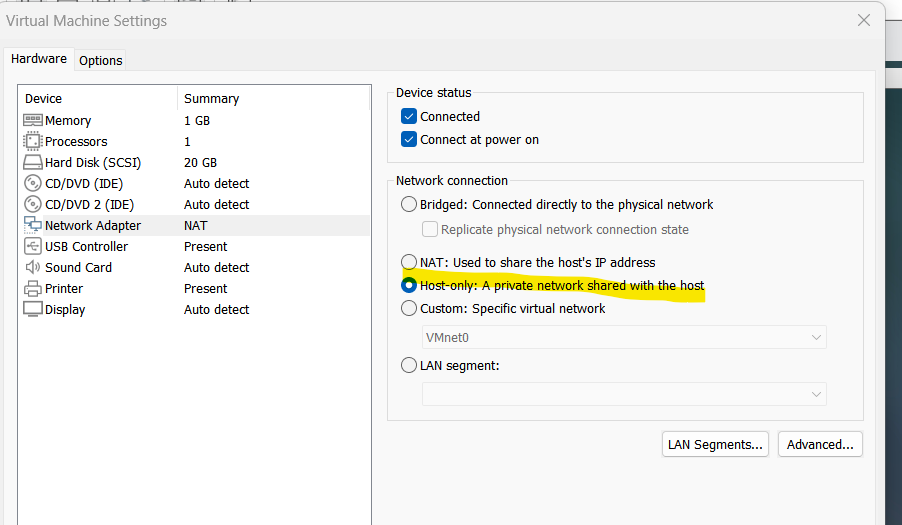
서버와 클라이언트 vm의 네트워크 어댑터 (=랜카드) 설정을 host-only로 변경
*host-only란
-> Host-only 네트워킹이란 호스트의 네트워크 아래에 사설망을 꾸며 이 사설망에 가상 머신들을 두는 구조를 가지고 있는 방식입니다. 단 이 사설망은 NAT 네트워킹과는 달리 NAT 라우터가 연결되어 있지 않기 때문에 게스트 컴퓨터에서는 호스트 컴퓨터를 제외한 외부로의 연결은 불가능합니다.
근데 혹시나 외부 인터넷 연결이 필요할 수도 있을 것 같아서,, nat으로
*nat이란
-> NAT 네트워킹이란 호스트의 네트워크 아래에 사설망을 꾸며 이 사설망에 가상 머신들을 두는 구조를 가지고 있는 방식입니다. 단 이 사설망은 NAT 라우터가 연결되어 있고 이를 통해 사설망 내부의 게스트 컴퓨터들도 외부에(인터넷) 연결하는 것이 가능해집니다.
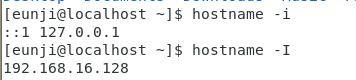
소켓 통신을 위한 ip 주소 확인
1. hostname -i(소문자) : 루프백 주소( 가상 머신 속 OS의 로컬 ip주소)=> 127.0.1.1
2. hostname -I(대문자) : 가상머신의 로컬 IP주소
소켓 통신은 아래 로컬 IP 주소로 이루어지는 것
iptables -I INPUT 1 -p tcp --dport 9999 -j ACCEPT # 외부에서 접속할 수 있도록 (서버, 클라이언트 모두)
iptables -I OUTPUT 1 -p tcp --dport 9999 -j ACCEPT # 내부에서 외부로 나갈 수 있도록 (서버, 클라이언트 모두)
systemctl restart firewalld # 설정 후 방화벽 재시작
서버와 클라이언트에 각각 방화벽 설정해주고 방화벽 재시작

firewall-cmd --zone=public --permanent --add-port=9999/tcp # 포트 열기
firewall-cmd --reload # 포트 적용
https://starseeker711.tistory.com/176
SUDO SU 처음에 안 되는거 해결
우분투 리눅스 - sudo 명령어에서 root 권한이 없을 때 ( ... is not in the sudoers file. This incident will be r
우분투 리눅스 - sudo 명령어에서 root 권한이 없을 때 ( ... is not in the sudoers file. This incident will be reported.) 간혹 root 권한이 없는 경우가 있습니다. sudo 명령어로 접근을 할 때, " (username) is not in the sud
starseeker711.tistory.com
telnet으로 서버 ip의 9999 포트 열렸나 확인하기 위해서 yum install telnet*으로 텔넷 설치
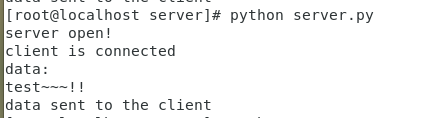

간단한 에코 서버 테스트 완료
++ NAT는 게스트 OS와 HOST OS 통신이 가능하니까
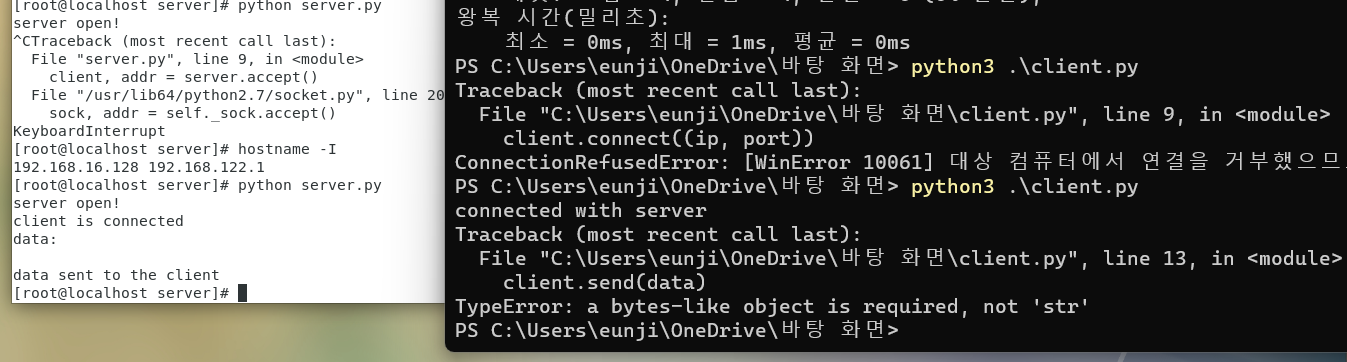
연결해봤는데 연결은 되는듯 근데 소켓에서 이상한 문제가,, 중요한건 아니니까 넘어감
쉘코드 client에 두고 쉘 스크립트 bash 명령으로 실행해서 결과 server로 소켓으로 넘겨지는것까지 확인함
이제 서버 db에서 쉘코드 가져와서 하는 거
#!/usr/bin/python3
# -*- coding: utf-8 -*-

import socket
from _thread import *
import pymysql


def threaded(client, addr):
    print('Connected by :', addr[0], ':', addr[1])

    while True:

        try:

            data = client.recv(25)

            if data.decode() == 'shell_code_to_server     ':
                client.sendall("shell_code_to_client     ".encode())
                db = pymysql.connect(host="localhost", port=3306, user="root", password="", database="bbo",

                                     charset='utf8')

                cursor = db.cursor()

                sql = "SELECT * FROM vuln_shell_list"

                cursor.execute(sql)

                result = cursor.fetchall()

                for record in result:
                    print(record[0])

                    msg = record[1].encode()

                    length = len(msg)

                    client.send(length.to_bytes(4, byteorder="little"))

                    client.send(msg)

                # client.sendall("shell_code_end".encode())

                db.close()

            if data.decode() == 'shell_result_to_server   ':
                print("shell result!!!")
                filename = './result.log'
                with open(filename, 'a') as f:
                    # print("file open")
                    data = client.recv(4)
                    length = int.from_bytes(data, "little")
                    data = client.recv(length)
                    print(data)
                    msg = data.decode()
                    f.write(msg)
                    f.close()

            if not data:
                print('Disconnected by ' + addr[0], ':', addr[1])

                break

            print('Received from ' + addr[0], ':', addr[1], data.decode())


        except ConnectionResetError as e:

            print('Disconnected by ' + addr[0], ':', addr[1])

            break

    client.close()


server = socket.socket()

server.bind(('192.168.16.128', 9999))

server.listen(1)

print("server open!")

while True:
    client, addr = server.accept()

    start_new_thread(threaded, (client, addr))

client.close()

server.close()
#!/usr/bin/python3
# -*- coding: utf-8 -*-
import os
import socket
ip = '192.168.16.128'
port = 9999
client = socket.socket()
client.connect((ip, port))
print("connected with server")
client.sendall("shell_code_to_server ".encode())
def exec_shell(shellfile):
print("함수 시작")
command = "su root " + shellfile
os.system(command)
filename = './shellcodes/shellcode'
result_file = open("./result.log", 'rb')
seek_file = open("./seek.txt", 'rb+')
while True:
data = client.recv(25)
print(data)
if data.decode() == 'shell_code_to_client ':
i = 1
shellfile_list = []
try:
# while True:
for _ in range(1, 3):
i = '{0:02d}'.format(i)
shellfile = filename + str(i)
shellfile_list.append(shellfile)
with open(shellfile, 'w+') as f:
data = client.recv(4)
length = int.from_bytes(data, "little")
print("쉘코드 전송 시작")
data = client.recv(length)
msg = data.decode()
f.write(msg)
f.close()
i = int(i) + 1
for i in shellfile_list:
exec_shell(i)
print("함수 종료")
client.sendall("shell_result_to_server ".encode())
a = result_file.seek(int(seek_file.readlines()[-1])) # 파일 안 읽었던 부분부터 읽어오기 위해 위치 seek로 찾음
print(a)
data = result_file.read() # result 파일 안 읽었던 부분부터 읽어옴
length = len(data) # 새로운 result 파일 길이 측정하고
client.sendall(length.to_bytes(4, byteorder='little')) # 파일 크기 전송
client.send(data) # result 서버의 result 파일로 전송
print(str(result_file.tell()).encode())
seek_file.write(str(result_file.tell()).encode())
seek_file.write("\n".encode())
except Exception as ex:
print(ex)
client.close()_thread 임포트 관련 에러 뜨는건 python3 설치해서 python3로 실행하면 문제 없음
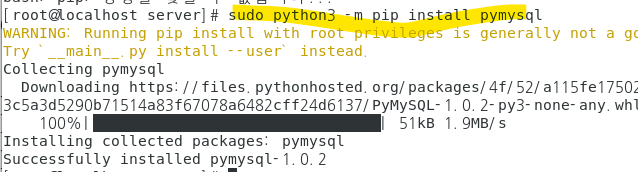
pymysql 설치하는 법 -> sudo python3 -m pip install pymysql
참고